Why this matters now
AI tools now let scammers write flawless emails, produce official-looking invoices and even imitate a person's voice on the phone. They use these tools to pose as the companies you already trust: your domain registrar, your web host, your IT provider.
Their favorite target is your domain name. Whoever controls your domain controls your website and your email, and your email is how password resets work for nearly every other account your business has.
Many businesses don't know where their domain is registered or whose name it's in. Often it's a former employee, a past web designer or an old IT vendor. This guide closes that gap.
You don't need to become technical. You need to know where four things live and make sure the keys are in your hands.
How it all connects
Your online presence rests on four pieces. They can all be run by different companies, which is normal, and also why it's so easy to lose track of them.
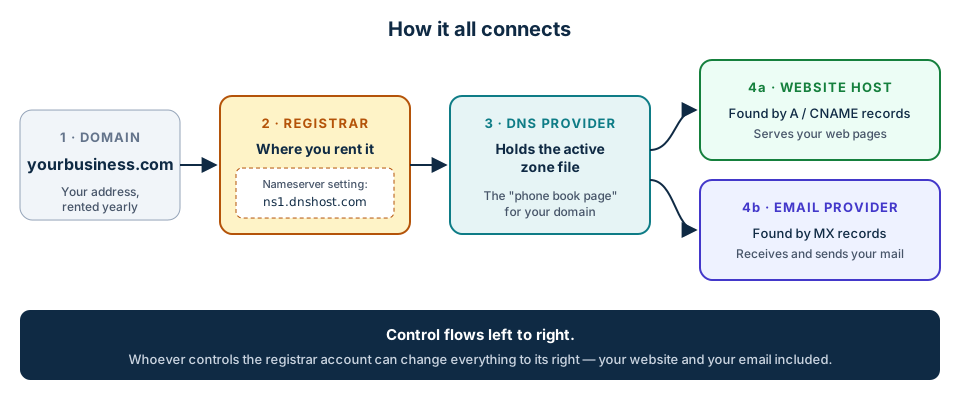
- Domain name: your address, such as yourbusiness.com.
- Registrar: the company you rent the domain from. It also holds the nameserver setting.
- DNS provider: the company that holds your live zone file, the list that says where everything goes.
- Website host and email provider: where your site and your mailboxes actually live.
What a domain name is
A domain name is your address on the internet. You don't buy it outright. You rent it, usually one to ten years at a time, and it has to be renewed.
The legal holder of a domain is called the registrant. That should be your business or you personally, not your vendor.
If a domain expires, there's usually a short grace period, then a recovery period with steep fees, and then it can be released for anyone to buy. Domain squatters watch for exactly this and try to sell expired names back to their former owners.
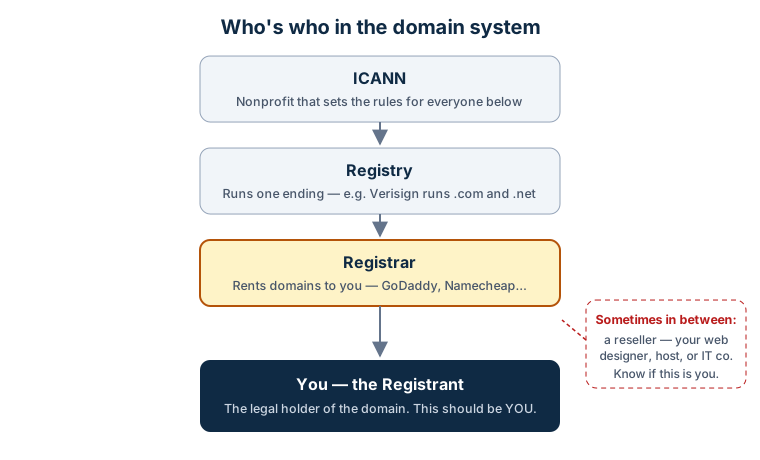
If your web designer or IT company registered your domain in their own account, you may not legally control it. Ask them to move it into an account in your name.
What a registrar is, and how to find yours
The registrar is the company you rent your domain from. Common ones include GoDaddy, Namecheap, Cloudflare, Squarespace Domains, Network Solutions and Porkbun.
Your registrar account is the single most important login for your online presence. It controls renewal, ownership, transfers and the nameserver setting that decides where everything else points.
Look it up in under a minute
- Go to lookup.icann.org.
- Type your domain name and search.
- Write down four things: the registrar, the expiration date, the domain status and the name servers.
- Registrar
- Example Registrar, LLCThis is who you rent from. You need your own login there.
- Expiration date
- 2027-03-14Put this on your calendar. Auto-renew should be on.
- Domain status
- clientTransferProhibitedThis is the transfer lock. You want to see it.
- Name servers
- ADA.NS.CLOUDFLARE.COM
BOB.NS.CLOUDFLARE.COMThis tells you which company holds your live DNS.
Status codes worth knowing
| Status | What it means | Good or bad |
|---|---|---|
| clientTransferProhibited | The transfer lock is on | Good |
| clientDeleteProhibited clientUpdateProhibited | Extra locks set by the registrar | Good |
| serverTransferProhibited | A lock at the registry level, often called "registry lock" | Very good |
| pendingTransfer | A move to another registrar is underway | Call now if you didn't start it |
| redemptionPeriod pendingDelete | The domain has expired | Renew immediately |
The lookup usually won't show your name. Privacy protection hides owner details, and that's normal. The only way to confirm you're the registrant is to log in to the registrar account and check the contact information.
Country endings such as .ca or .co.uk sometimes need the country registry's own lookup tool. The ICANN lookup covers .com, .net, .org, .biz, .us and most others.
What DNS is
DNS, the Domain Name System, is the internet's phone book. Computers find each other by numeric addresses. DNS turns your name into the right number, every time someone visits your site or sends you an email.
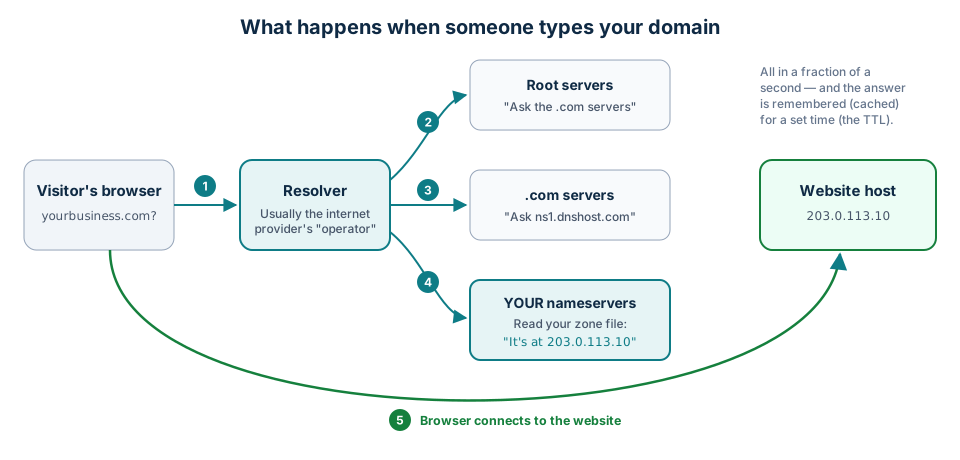
- A visitor types your domain. Their device asks a resolver, usually run by their internet provider.
- The resolver asks the root servers, which point it to the servers for .com.
- The .com servers say which nameservers are in charge of your domain.
- Your nameservers read your zone file and return the address of your website.
- The browser connects to your website host and loads the page.
Resolvers remember answers for a set time called the TTL (time to live). That's why a DNS change can take anywhere from minutes to a few hours to show up everywhere.
Nameservers: who's in charge of your DNS
Nameservers, also called DNS servers, are the servers that answer questions about your domain. The nameserver setting lives at your registrar and points to whichever company hosts your DNS. That might be the registrar itself, Cloudflare, your web host or someone else.
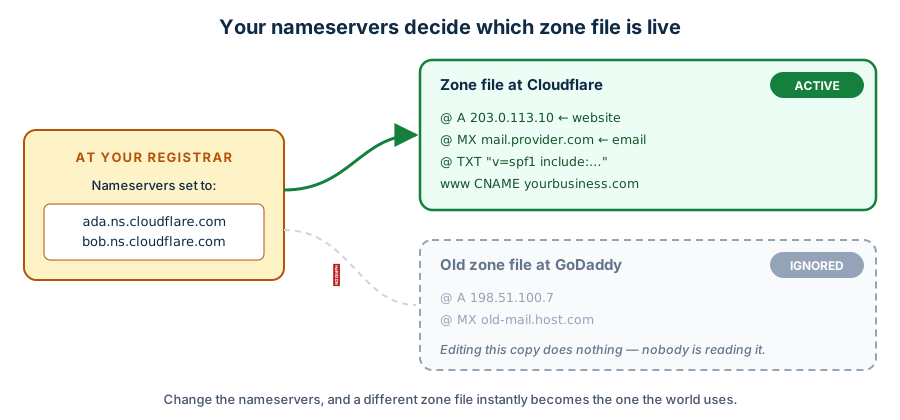
You can have zone files at several companies, but only the one your nameservers point to is real. This is the most common reason for "I changed my DNS and nothing happened."
It's also why the registrar account matters so much. Anyone who can change your nameservers can swap in their own zone file and take over your website and your email at the same time, without touching either one.
The DNS zone file
The zone file is the list of records for your domain: your page in the internet's phone book. It's small, rarely looked at, and it controls where everything goes. Here's what a simple one looks like.
;; yourbusiness.com — example zone file
@                3600 IN A      203.0.113.10                ; website
www              3600 IN CNAME  yourbusiness.com.           ; www goes to the same place
@                3600 IN MX 10  mail.emailprovider.com.     ; email delivery
@                3600 IN TXT    "v=spf1 include:_spf.emailprovider.com -all"
sel1._domainkey  3600 IN TXT    "v=DKIM1; k=rsa; p=MIIBIjANBg…"
_dmarc           3600 IN TXT    "v=DMARC1; p=quarantine; rua=mailto:dmarc@yourbusiness.com"
@                3600 IN CAA    0 issue "letsencrypt.org"
| Record | Plain English | If it's wrong or changed |
|---|---|---|
| A / AAAA | The street address of your website | Site goes down or goes to an impostor |
| CNAME | An alias: "same as that other name" (for example, www) | Part of your site breaks |
| MX | Where your email is delivered | Email stops, or goes to someone else |
| TXT · SPF | Which services may send email as you | Your mail lands in spam, or fakes get through |
| TXT · DKIM | A digital signature on your outgoing mail | Same as SPF |
| TXT · DMARC | Tells receivers what to do with fakes of your domain, and sends you reports | Scammers can send convincing mail "from" you |
| TXT · verification | Proves you own the domain to Google, Microsoft and others | Connected services stop working |
| CAA | Which companies may issue security certificates for you | Less protection against fake certificates |
| NS | Lists your nameservers | Should match the setting at your registrar |
Most DNS providers let you export your zone file. Save a copy every time it changes. If anything ever goes wrong, that copy is how you rebuild in minutes.
How AI changed the threat
None of these scams are new. What AI changed is the polish and the volume. The spelling mistakes and awkward phrasing that used to give phishing away are gone.
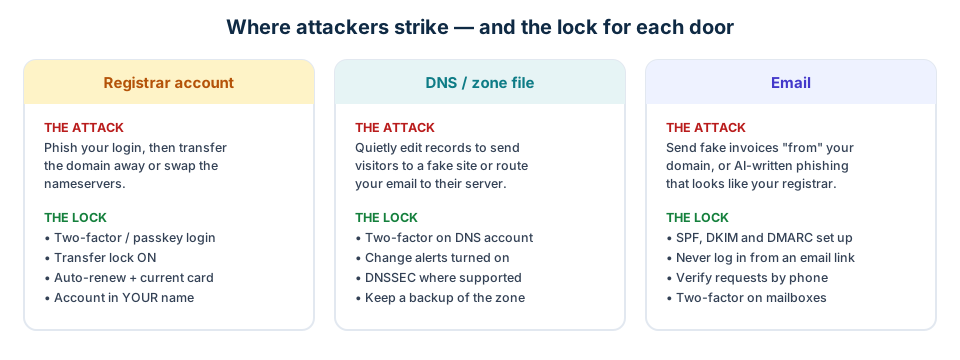
Fake renewal notices
Official-looking letters or emails from companies you don't use, charging inflated prices or tricking you into moving your domain to them.
Registrar or host impersonation
An email with a link to a fake login page. With your password and code, attackers unlock and transfer your domain or change its nameservers.
Help-desk impersonation
Someone calls your registrar pretending to be you, sometimes with a cloned voice, to reset your account access.
DNS hijacking
Quietly edited records send visitors to a copycat site or route your email through the attacker's server.
Spoofed email and fake invoices
Messages that look like they came from your domain, asking customers to pay or change wire instructions. Without DMARC, receivers can't tell they're fake.
Lookalike domains
Names like yourbuisness.com or yourbusiness.co, registered to fool your customers. They aren't your domain, but they borrow your reputation.
A lapsed renewal
Not an attack, but still the most common way businesses lose a domain: an expired card, or renewal notices going to an ex-employee's inbox.
No legitimate registrar, web host, or Brewer Marketing Group will ever ask you to email or text a password, a login code or a transfer code.
Logins that hold up
Everything in this guide comes back to a handful of logins: your registrar, your DNS, your email. Here's how to make those logins hard to steal, in plain terms. The same advice covers your bank and your accounting software, so it's time well spent.
Passwords that work
Length matters more than cleverness. Three or four unrelated words, such as canoe-lantern-fourteen-maple, is far stronger than a short password with a symbol swapped in, and it's easier to type. The bigger rule is never to reuse a password. When a company you've never heard of gets breached, the passwords leak, and attackers try every one of them against email providers, banks and registrars. One reused password is how a breach somewhere else becomes a problem for you.
Password managers
A password manager is an app that invents a different long password for every site and fills it in for you. You remember one password; it remembers the rest. It also stores backup codes and notes, so it becomes the one place your business's keys live.
- Built in and free: Apple Passwords (iPhone and Mac) or Google Password Manager (Android and Chrome). Fine for most small businesses.
- Dedicated apps: 1Password or Bitwarden. Better when several people need shared access, because you can share a vault instead of a password.
- Either way: the account should belong to the business, and at least two people should be able to get in. A notebook, a spreadsheet or a shared browser profile doesn't count.
Two-step verification, from good to best
Two-step verification (also called two-factor or 2FA) means a stolen password alone isn't enough to log in. Every method helps. Some help a lot more than others.
| Method | How it works | How strong |
|---|---|---|
| Text-message code | A six-digit code is texted to your phone each time you log in | Good Better than nothing, but codes can be phished or your number hijacked |
| Authenticator app | An app such as Google Authenticator, Microsoft Authenticator or Authy shows a code that changes every 30 seconds. Works without cell service | Better Nothing travels over text, so it's much harder to intercept |
| Passkey | A login tied to your phone or computer and unlocked with Face ID, a fingerprint or your device PIN. No password, no code to type | Best Can't be phished, because there's nothing to hand over |
| Hardware key | A small USB or tap-to-phone key, such as a YubiKey, that you touch to log in | Best Same protection as a passkey; good for shared or high-value accounts |
Biometrics unlock a key that's stored on your own device. Your face or fingerprint never leaves the phone and is never sent to the website. It's the same as using your face to unlock the phone itself.
Most registrars, Google, Microsoft and Apple now offer passkeys. Set one up, and keep an authenticator app or backup codes as the fallback in case you lose the device.
Do this 30 min
- Turn on two-step verification for your registrar, your email and your bank first. Use an authenticator app or a passkey where offered.
- Save the backup codes each site gives you in your password manager, not in your email.
- Move every business login into a password manager and change any password you've used in more than one place.
- Make sure a second person in the business can get in if you can't: a shared vault, or sealed backup codes somewhere safe.
Protect your domain and website
Work through these in order. The first group takes about fifteen minutes and covers most of the risk.
Do today 15 min
- Look up your domain at lookup.icann.org and write down the registrar, expiration date and nameservers.
- Confirm you can log in to the registrar account yourself, and that it's in your business's name.
- Turn on two-step verification. Use an authenticator app or passkey rather than text messages where possible (see Logins that hold up).
- Turn on auto-renew and check the card on file. Consider renewing for several years.
- Make sure the transfer lock is on.
This month 1 hour
- Set the account email to an address you'll always have, ideally not on the same domain, so you can still get in if the domain breaks.
- Give your web or IT partner delegate access instead of sharing your password. Most registrars support "account users" or delegate access.
- Turn on two-factor and change alerts at your DNS provider, and export your zone file.
- Make sure SPF, DKIM and DMARC are set up for your email. Ask your email provider, or ask us.
- Store all of these logins in a password manager your business owns.
High-value domains as needed
- Ask your registrar about registry lock, a manually verified lock at the registry level.
- Turn on DNSSEC if your DNS provider supports it. It digitally signs your DNS answers so they can't be forged.
- Add CAA records.
- Register obvious misspellings and other endings you care about.
- Review who has access once a year, and right away when an employee or vendor leaves.
How to fire your website provider
You should be able to leave any provider, including us, without losing your domain, your site or your email. If you can't, something is set up wrong, and it's worth fixing before you ever need to leave.
What you need before you leave
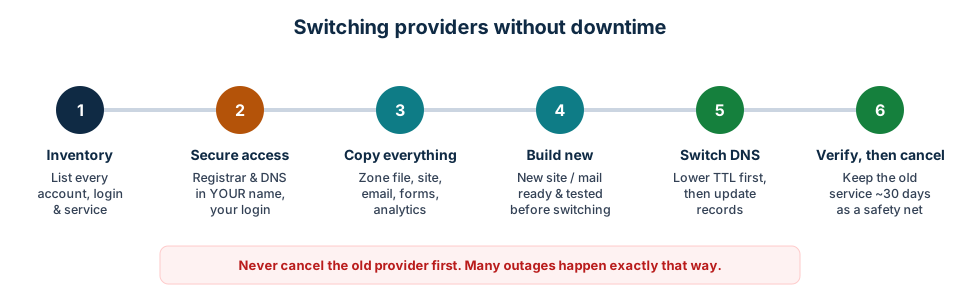
- Registrar access in your name. If the domain sits in the provider's account, ask them to move it to yours first.
- DNS access, plus an exported copy of the zone file.
- A full export or backup of your website: content, images, documents, any database, and any custom code you paid for.
- Your contract terms on who owns the design and code.
- Whatever logins you have for the website itself. For a site that's fully managed for you, that may be none at all, and that's normal: the handoff is a transfer your provider does with you, not a password you need to dig up. If you do have an editor or admin login, note it.
- Logins for the tools around the site, where they exist: forms, booking and payment tools, analytics, Google Search Console, Google Business Profile, ad accounts, and any plugins or licenses.
- A list of every connected service: CRM, email marketing, IDX or MLS feeds, chat widgets, tracking pixels.
- SSL certificate: usually re-issued automatically by the new host. No action needed in most cases.
Making the switch
- Build the new site on a temporary address and test it fully.
- A day ahead, lower the TTL on your website records so the change spreads quickly.
- Point the website records (A or CNAME) to the new host, or change the nameservers if the new host runs your DNS.
- Test pages, forms and the security padlock.
- Keep the old host running for about 30 days, then cancel.
Changing website hosts doesn't require moving your domain or your email. Only touch the website records.
How to fire your email provider, and others
Email provider
- Set up the new service and create every mailbox first.
- Move old mail over. Most providers have a migration tool. Include shared mailboxes, aliases, group lists and calendars.
- Update the MX records. Replace SPF, add the new DKIM, keep DMARC.
- Update email settings on phones and computers.
- Keep the old account about 30 days to catch stragglers, then cancel.
If your email comes with your web hosting, cancelling the host cancels your email.
DNS provider
- Copy every record to the new provider before changing anything. Compare them line by line.
- Change the nameservers at your registrar.
- For a while both will answer. That's fine as long as they match.
Registrar (moving the domain)
- Unlock the domain and request the transfer authorization code. Treat it like a password.
- Start the transfer at the new registrar. The fee usually adds a year to your registration.
- Approve the confirmation emails. Transfers usually finish within about five days.
- Keep the same nameservers during the move so nothing goes down.
- Turn the transfer lock and two-factor back on at the new registrar.
A domain can't be moved again right after it's registered or transferred. That waiting period is currently up to 60 days, and ICANN has approved shortening it to 30.
Your domain fact sheet
Fill this in once and keep it somewhere safe. When something goes wrong, or a vendor leaves, this page is what you'll reach for.
| Domain name(s) | |
| Registrar | |
| Registrar login email · who has access | |
| Registered in the name of | |
| Expiration date · auto-renew on? | |
| Card on file ends in | |
| Two-factor on? · transfer lock on? | |
| Nameservers · DNS provider · DNS login | |
| Website host · platform · login (if you have one) | |
| Email provider · admin login | |
| SPF / DKIM / DMARC set up? | |
| Where passwords are stored | |
| Who to call in an emergency | |
| Date last reviewed |
Glossary
- Domain
- Your name on the internet, such as yourbusiness.com.
- Registrant
- The legal holder of a domain. Should be you or your business.
- Registrar
- The company you rent your domain from.
- Registry
- The organization that runs one ending, such as .com.
- Reseller
- A designer, host or IT firm that registers domains for clients through its own account.
- ICANN
- The nonprofit that sets the rules for domain names.
- DNS
- Domain Name System. The internet's phone book.
- Nameserver
- A server that answers DNS questions for your domain. Set at your registrar.
- Zone file
- The list of DNS records for your domain.
- Record
- One line in the zone file, such as where the website or the email goes.
- TTL
- Time to live. How long a DNS answer is remembered before it's checked again.
- A record
- Points your domain to the numeric address of your website.
- CNAME record
- An alias: "this name is the same as that one," often used for www.
- MX record
- The record that says where your email is delivered.
- TXT record
- A text note in your zone file, used for SPF, DKIM, DMARC and ownership verification.
- SPF
- Lists which services may send email as your domain.
- DKIM
- A digital signature on your outgoing mail that proves it wasn't altered.
- DMARC
- Tells receivers what to do with mail that fails SPF or DKIM, and sends you reports.
- CAA record
- Limits which companies may issue security certificates for your domain.
- DNSSEC
- Digital signatures on DNS answers so they can't be forged.
- Transfer lock
- A setting that blocks your domain from being moved to another registrar.
- Registry lock
- A stronger lock at the registry level that requires manual verification to change.
- Authorization code
- Also called an auth, EPP or transfer code. The secret that allows a domain transfer.
- Two-step verification (two-factor, 2FA)
- A second step at login, like a code from an app, so a stolen password isn't enough.
- Authenticator app
- An app that shows a login code that changes every 30 seconds, used as the second step.
- Passkey
- A login tied to your device and unlocked with Face ID, a fingerprint or a PIN. Replaces the password and can't be phished.
- Password manager
- An app that creates and stores a different strong password for every account.
- Phishing
- A fake message designed to trick you into giving up a password or code.
Questions we hear most
- I pay BMG for my website. Does that mean BMG owns my domain?
- No. Hosting your website and holding your domain are separate things. Your domain should be registered in your name, at a registrar where you have your own login. If we registered it on your behalf years ago, we'll move it into an account in your name. Just ask.
- The lookup doesn't show my name. Is something wrong?
- Usually not. Most registrars hide the owner's contact details behind privacy protection. The only way to confirm the domain is yours is to log in to the registrar account and check the registrant contact.
- I got an email saying my domain is about to expire. Is it real?
- Check the sender. If it isn't the registrar shown in your lookup, it's almost certainly a scam or an overpriced reseller. Never click the link. Go to your registrar's website directly and look at the expiration date there.
- My web designer or IT person set everything up. Do I need to change anything?
- Only if the domain or DNS sits in their account rather than yours. Ask them to move the domain into an account in your name and give you a login to the DNS. A good vendor will be glad to.
- What's the difference between my registrar and my DNS provider?
- The registrar is where you rent the name. The DNS provider holds the zone file that says where your website and email live. They can be the same company, but often aren't. The nameserver setting at the registrar is what connects the two.
- I don't have a login for my website. Is that a problem?
- Not by itself. Many of our clients have never needed one, because we manage the site for them. What matters is that your domain and your email are in your name. If you ever change providers, the website itself is transferred with you; it isn't something you'd need a password to carry out the door.
- If I switch website providers, will my email break?
- Not if it's done right. Your email depends on the MX and related records in your zone file, not on your website host. A careful switch only touches the website records.
- Do I really need SPF, DKIM and DMARC?
- Yes. Without them, your email is more likely to land in spam, and scammers can send mail that looks like it came from you. They're small records that take a few minutes to add. Your email provider or BMG can help.
- What happens if I lose the phone with my authenticator app?
- You use the backup codes the site gave you when you set it up, which is why they belong in your password manager. If you have a passkey or a second device signed in, you can also log in from there and add a new phone. Set up the fallback the same day you turn two-step on.
- Is a password manager safe? What if it gets hacked?
- The good ones store your vault encrypted with a key only you hold, so even the company can't read it. The real risk is a weak master password or no two-step on the manager itself, so make that master password long and turn two-step on. It's still far safer than reusing passwords or keeping them in a notebook.
- How long does a domain transfer take?
- Usually about five days once you approve the confirmation emails. Your website and email keep working during the move as long as the nameservers don't change.
Official resources
- ICANN Lookup — the official tool for looking up any domain's registrar, expiration date, status and nameservers.
- ICANN — Registrant Benefits and Responsibilities — your rights as the holder of a domain.
- ICANN — Transfer Policy — the rules every registrar must follow when a domain moves.
- FTC — How to Recognize and Avoid Phishing Scams — plain-language advice from the Federal Trade Commission.
- CISA — Turn On Multifactor Authentication — the U.S. cybersecurity agency on two-factor authentication.
How BMG can help
Not sure where your domain is or who controls it?
Reply to our email or call us and we'll do a free domain check-up: we'll look it up with you, explain what we find, and help get the keys back in your hands. Our goal is simple. Our clients always hold their own keys.